


Air France - Book a flight
4.4837.00 Reviews
App Specs
- Version
- 16.11.0
- Updated On
- License
- Free
- Downloads
- 5,000,000+
- Developer
- AIRFRANCE S.A.
- Categories
- Travel & Local
- Platform
- Android, iOS
Screenshots



 Analysis by AppCompare
I’d approach Air France - Book a flight as a useful companion for a trip I expect to take with Air France, rather than as a universal travel app. Its main appeal is having flight search and trip management together, so I can move from choosing a journey to keeping its details close at hand. If you’re opening it for the first time, the simplest goal is not to explore every menu: search for a route you actually plan to take, check the options, and see whether the booking flow suits you.
What to expect from an airline-specific app
This is a free travel app from AIRFRANCE S.A., and its focus is naturally narrower than a general travel marketplace. That distinction matters. A broad booking service can be handy when I’m comparing many airlines in one place; Air France’s own app makes more sense when I already want to fly with the airline or need a place to manage that journey. It has an average rating of 4.5 from around 164,000 ratings, but ratings alone can’t tell you whether its workflow fits your plans.
The app has been available since January 23, 2014, and its current version is 16.9.0, with Android 8.0 as the minimum operating system listed. It is rated for everyone and has over 5 million installs. Those details give a first-time user a sense of its established presence, but I’d still begin by checking that my device can run it and that I’m downloading the official Air France app.
My expectation would be practical rather than magical: an airline app can put relevant travel tasks in one place, but it doesn’t remove the decisions involved in choosing dates, fares, or a route. I’d use it to handle the Air France part of a trip, then keep any separate hotel, ground transport, or other airline arrangements wherever I normally manage them.
Getting Started with the App
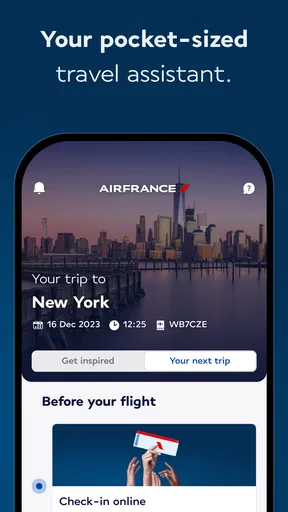
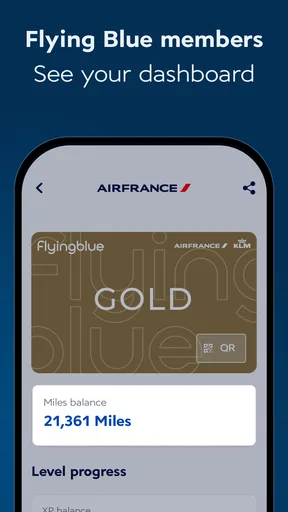
The first thing you notice when you open the Air France - Book a flight app is its sleek and modern interface. It’s like the Marie Kondo of travel apps—clean and clutter-free. Signing up is straightforward, and if you’re already an Air France frequent flyer, you can easily sync your Flying Blue account. This means your miles and benefits are at your fingertips, ready to whisk you away to your next destination.
Set up only what you need
For a first visit, I’d start with the basics and avoid treating account setup as a hurdle to clear before I can decide whether the app is useful. If I’m already a Flying Blue member, linking that account is a sensible early step because it brings the loyalty side of my travel into the same experience. If I’m not a member, I’d first see whether the booking and trip-management tools meet my immediate need rather than signing up for something I may not use.
Before searching, I’d have my preferred departure and arrival cities and a rough idea of dates in mind. That sounds obvious, but it prevents a common first-use trap: judging flight results from an accidental city or date entry. For a city served by more than one airport, I’d double-check the airport shown in the search before comparing fares. A price can look appealing while the departure point is inconvenient for the rest of the journey.
Worth Reading Before You Choose

Flipboard Shows What News Apps Must Do Beyond the Feed

Switching to Android Auto Means Rethinking Your Driving Routine

Google Calendar Makes a Crowded Week Easier to Manage

Ludo King Makes the Most of the Minutes Between Plans

Baby Panda World Brings Quick Play to Modern Phones, but Its Game Library Feels Busy

ESPN’s Live Game View Makes Following Close Games Easier
Flight Booking Made Simple
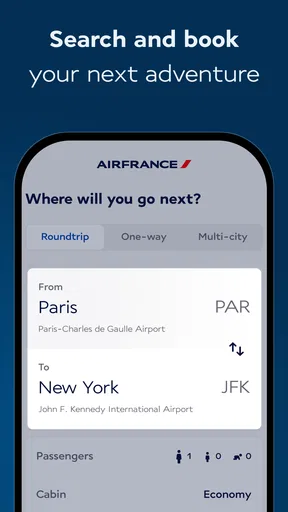
Let’s talk about the main event: booking flights. The process is surprisingly intuitive. You can search for flights by entering your departure and destination cities, along with your travel dates. The app then churns out a list of available flights, complete with prices and options for different classes. If you’re like me and enjoy comparing options, you’ll appreciate the detailed breakdown of fares and amenities.
What’s cool is that you can also filter results based on your preferences. Whether you want a direct flight or need to stick to a budget, the app’s got you covered. And for those who love a good deal, the notification feature alerts you to any price drops or special promotions. It’s essentially your personal travel agent, minus the fees.
Make the first search a useful one
My first meaningful test would be a real route and a flexible date window only if my plans genuinely allow it. I’d compare the options that matter to me—such as a direct journey against one with a connection—rather than sorting by price and choosing the first result automatically. A lower fare is not automatically the better choice if its timing makes the day difficult or its conditions don’t suit how I travel.
I’d also pause over the fare details before paying. Comparing fare options is more useful when I’m clear about what I’m choosing, not simply looking at the headline price. If I’m travelling with checked luggage, need flexibility, or have a tight schedule, I’d weigh those needs against the displayed fare and amenities. This is a small habit, but it can prevent the common mistake of treating two differently structured fares as identical.
For a realistic everyday example, imagine I’m arranging a work trip while commuting home. I can enter the route and dates, narrow the results to a direct flight if arriving on time matters more than saving money, and review the available options before I commit. If I’m not ready to book, I can stop there and return when my dates are settled; a search is still useful for understanding what choices I need to make.
Managing Your Bookings
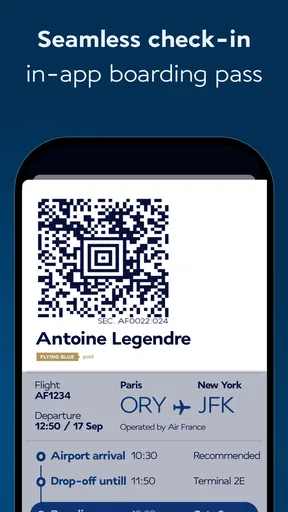
Once your flights are booked, the app continues to shine. Managing your bookings is a breeze. You can view your itinerary, make changes if needed, and even check-in directly from the app. Say goodbye to long lines and hello to the convenience of mobile boarding passes. It’s like carrying your entire travel itinerary in your pocket.
Traveling with family or a large group? No problem. The app allows you to manage multiple passengers under one booking, making family vacations or group trips less of a logistical nightmare.
Keep the trip details easy to retrieve
After booking, I’d make a point of opening the itinerary again before travel rather than assuming I’ll remember where everything is. That is especially helpful if plans have changed since purchase: the itinerary is the place to check the details I’ll need, and the app can be used for changes when they are available for my booking. I’d review the information before leaving for the airport, not while rushing through it.
For a group, managing several passengers under one booking can reduce the work of jumping between separate records. It does not mean every traveller’s preferences or arrangements should be assumed to match, though. I’d check each person’s details and make sure the group is working from the same travel plan. For complicated trips with separate bookings, keeping a separate note of who is travelling on which reservation can make coordination clearer.
Mobile check-in and boarding passes are convenient, but I would treat them as one part of preparation rather than the whole airport plan. I’d make sure I can access the necessary trip information before setting out and keep a backup way to find my booking details. This is a sensible precaution whenever travel plans depend on a phone, especially if I expect to be moving between networks or need to conserve battery.
Additional Features
Beyond flight bookings, the app offers a bunch of extras that make it a one-stop shop for travel needs. You can book hotels, rent cars, or even arrange for travel insurance. It’s all about giving you a seamless travel experience. I particularly love the travel guide section, which offers tips and recommendations for your destination. It’s like having a local guide in your pocket.
The app also integrates with your calendar, ensuring you never miss a flight or important travel-related event. Plus, the customer support chat feature is a lifesaver if you encounter any hiccups along the way. They’re quick to respond and genuinely helpful.
Use the extras selectively
I’d think of the additional travel services as conveniences to compare, not as a reason to move every part of a trip into one app. If I need a hotel or a rental car, having those options nearby can help me plan the trip in one sitting. But I’d still compare the terms and details with the options I normally use, especially when a reservation has its own cancellation conditions or timing requirements. Convenience is valuable only if the arrangement itself fits.
The calendar connection is most useful after the trip details are settled: it can give me another place to notice an upcoming flight or travel-related event. I’d check that the calendar entry reflects the itinerary I intend to follow, especially if I later make a change. For destination ideas, I’d use the travel guide as a starting point and then check whether a suggestion fits my location, schedule, and interests rather than treating it as a complete itinerary.
If something goes wrong, the in-app support option is worth trying when the issue concerns an Air France booking. For matters involving a separate hotel or another travel provider, I’d contact the company responsible for that reservation instead. Keeping the request with the right provider is a practical way to avoid being passed between services.
Where the experience can feel less simple
An airline’s own app has a clear trade-off: it can be a convenient home for that airline’s flights, but it is not the best single place to compare every carrier. If I’m undecided about which airline to use, a general flight-search service may give me a broader view before I settle on a choice. Once I know I want an Air France flight, the airline app becomes more relevant for booking and looking after that trip.
Likewise, an app cannot make a complicated itinerary simple just because the screens are tidy. Multiple reservations, changing plans, or a group with different needs still call for careful checking. I’d be cautious about making a last-minute change without first reading what the booking allows, and I’d confirm that the itinerary shown matches what I expect before relying on it.
There is also a difference between booking on a phone and planning on a larger screen. I find a phone convenient for a focused search or a quick check of a trip, while a computer can be more comfortable if I’m comparing several dates, routes, and travel arrangements at once. Neither approach is inherently better; I’d choose based on how much I need to compare and where I am in the planning process.
User Experience
In terms of user experience, the app is a joy to use. It’s fast, responsive, and doesn’t crash mid-booking (a personal pet peeve). The design is intuitive, with all the features you need just a tap away. Whether you’re a tech-savvy traveler or someone who usually struggles with apps, you’ll find this one easy to navigate.
Security is another important aspect. The app ensures all your personal and payment information is securely stored. It uses encryption and other security measures to protect your data, so you can book with peace of mind.
Who will get the most from it
I’d recommend it most to people who expect to book or manage Air France travel and want the airline’s own tools close by. Frequent flyers who use Flying Blue have a particular reason to keep it handy, while occasional travellers can still find value in the booking and itinerary workflow. The app’s appeal is less obvious if you only want to compare airlines, rarely travel with Air France, or prefer to keep every travel service in a separate specialist app.
For a first-time user, the reassuring route is straightforward: install it, check that the device meets the Android requirement if using Android, search one genuine journey, inspect the fare details, and decide whether the result suits your plans. You do not need to explore every extra before you know whether the core flight search is useful to you. If you already have a booking, move directly to its itinerary and check-in tools instead of repeating a search.
Final Thoughts
Overall, the Air France - Book a flight app is a must-have for anyone who regularly travels with Air France or just wants a reliable app for booking flights. It combines functionality with user-friendly design, making it easier than ever to plan your travels. From booking flights to managing your itinerary, this app does it all with ease and efficiency.
So, if you’re planning your next trip and want an app that handles all your travel needs, give this one a try. It’s like having a travel concierge in your pocket, ready to help you jet off on your next adventure with zero stress. Bon voyage!
Pros
- User-friendly interface with intuitive navigation.
- Comprehensive flight search with multiple filters.
- Secure payment options for peace of mind.
- Real-time flight status updates and alerts.
- Integrated loyalty program management.
Cons
- Limited in-app customer support options.
- Occasional slow loading times reported.
- Some features require stable internet.
- Limited language options for international users.
- Seat selection can be cumbersome on mobile.
FAQs for Air France - Book a flight
What features does the Air France app offer?
The Air France app provides a comprehensive travel experience with features such as flight booking, check-in, boarding pass storage, and real-time flight status updates. Users can manage bookings, choose seats, and access travel information. The app also offers exclusive deals and loyalty program integration with Flying Blue for frequent travelers.
Is the Air France app available for both Android and iOS?
Yes, the Air France app is available for both Android and iOS devices. Users can download the app from the Google Play Store for Android devices and the Apple App Store for iOS devices. It offers a seamless experience across different platforms, ensuring accessibility for a wide audience.
Can I manage my bookings through the Air France app?
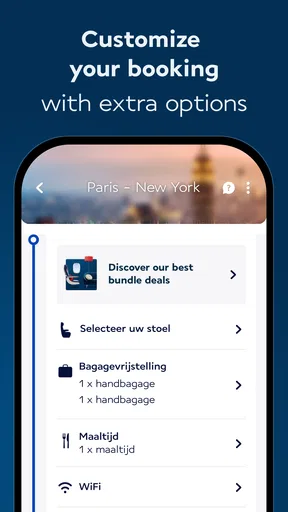
Absolutely! The Air France app allows you to easily manage your bookings. You can view and modify your flight details, select or change seats, and even add additional services such as extra baggage. This feature ensures that you can handle all your travel arrangements conveniently from your mobile device.
How does the app handle check-in and boarding passes?
The Air France app simplifies the check-in process by allowing you to check in directly from your phone. Once checked in, your boarding pass is stored within the app, eliminating the need for paper passes. You can access and use your digital boarding pass even without an internet connection, making it highly convenient.
Are there any special deals or promotions available through the app?
Yes, the Air France app frequently offers exclusive deals and promotions for flights. Users can receive notifications about special offers, discounts, and last-minute deals directly through the app. Additionally, members of the Flying Blue loyalty program can take advantage of tailored promotions and earn miles for their bookings.


